AI Enabled Exploits Trigger Google Penalties
(1 June 2026) AI enabled exploits are already hurting websites in ways that can look, from the outside, a lot like “Google penalties”—sudden traffic drops, security warnings in the SERPs, or entire sites disappearing from search—even when the root cause is a hack, not an algorithm update. Below is an article tailored to readers of Google Penalty.com: site owners, SEOs, and consultants trying to work out why rankings crashed and how to recover.
The recent exploit of cPanel is a good reminder of how external factors can appear to be a penalty. A large number of hosts were hit, impacting all the domains in these accounts, taking them offline leading to deindexing, loss of ranks & traffic.
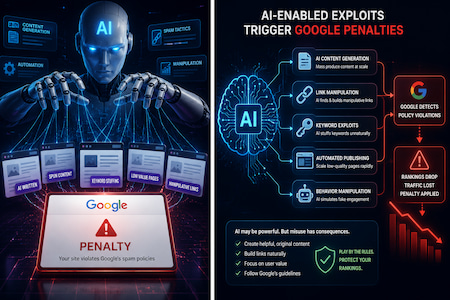
AI Enabled Exploits: The New Hidden Cause Behind “Google Penalties”
If your traffic suddenly tanks, your first instinct is to blame a Google update or a manual action—and that’s often right. But there’s another fast growing cause of “penalty like” symptoms that a lot of site owners are missing: AI assisted hacking and exploitation of the systems that host and power your website.
In the last year, a new class of AI tools has started finding and exploiting vulnerabilities in hosting control panels, web apps, and the software supply chain itself. The result can be SEO killing damage—malware injections, cloaked redirects, deindexing, and browser warnings—that looks exactly like a Google penalty from the outside, but will never be fixed by rewriting title tags or cleaning up anchor text.
This article explains:
- What these AI enabled exploits are.
- Concrete examples, including a critical cPanel zero day.
- How they show up in Google data and what they do to your rankings.
- What you should add to your audit process before you decide “this is a penalty.”
Mythos Class AI and Why It Matters for SEO
Anthropic has previewed an internal AI system called Mythos: a frontier level model designed to automatically discover and exploit vulnerabilities across real world codebases—operating systems, browsers, libraries, and more. In tests, Mythos class tools have reportedly found vulnerabilities that sat unnoticed for decades, including a 27 year old bug in OpenBSD and a 16 year old bug in FFmpeg.
This capability is being rolled out defensively through Project Glasswing, where selected organizations (including cloud and software giants) use Mythos style analysis to scan their own infrastructure and patch issues before attackers do. That’s the good news.
The bad news for website owners:
- You don’t need Mythos to weaponize vulnerabilities. Criminal groups already use a mix of LLMs and traditional tooling to search for bugs, generate exploits, and automate attacks.
- When those attacks hit your hosting stack or CMS, the SEO symptoms look identical to penalties: sudden rank loss, spammy content you didn’t create, or “harmful site” labels in Google.
For readers of Google Penalty.com, the key takeaway is: every penalty investigation should now include the question “Did an attacker get into my hosting or app, possibly using AI assisted methods?”
The cPanel Zero Day: When Your Host Becomes the Attack Vector
In April 2026, cPanel disclosed a critical authentication bypass in cPanel & WHM, tracked as CVE 2026 41940, with a CVSS score of 9.8. This is software that sits underneath millions of sites: if you’ve ever managed your site via a shared host, there’s a decent chance cPanel is involved somewhere.
SecurityWeek and others reported that:
- The vulnerability affects all cPanel & WHM versions after 11.40.
- It allows a remote, unauthenticated attacker to bypass the login process and gain administrative access to WebHost Manager.
- It was exploited as a zero day for months before the vendor publicly acknowledged and patched it.
From a website and SEO perspective, what does “attacker gets root level WHM access” mean?
- They can edit or replace your site’s files and configuration, inject malware, or install webshells.
- They can access databases and backups if credentials or dumps are stored on the server.
- They can mass infect every site on that shared server in one shot.
Forum posts and social media discussions around the time of disclosure describe hosts quickly patching, rebooting, or even taking servers offline, and site owners waking up to outages, defacements, or strange redirects. Many of those owners likely experienced sudden organic traffic drops, but the root cause was infrastructure, not a Google algorithm tweak.
Today, a Mythos class system could identify exactly this kind of logic flaw in authentication code. Even without that, AI assisted exploitation—using models to generate scanning and exploitation scripts, tune payloads, and auto manage compromised servers—makes it far easier to hit thousands of cPanel instances very quickly once a bug is known.
How a cPanel Level Exploit Feels Like a Penalty
From your vantage point in Search Console and analytics, a cPanel compromise can look like:
- Sudden impressions and clicks collapse on formerly stable pages.
- New URLs appear that you didn’t create, often with spammy paths or parameters.
- Google flags your site with “This site may be hacked” or malware warnings.
- Disavow files, content rewrites, and link cleanup don’t help, because you’re treating a hack like a penalty.
If you’ve ever thought “we’ve cleaned up all the SEO issues but rankings are still dead,” and you’re on low cost shared hosting, a control panel compromise (whether via AI assisted attackers or not) should be high on your suspect list.
AI Assisted Attacks: Beyond Your CMS and Into Your Stack
It’s tempting to think “this is just about hosting panels,” but AI enabled attacks are touching many pieces of the stack that feed into your website.
Security vendors and cloud providers highlight several trends:
- Automated vulnerability discovery: AI models ingest huge codebases—including open source libraries you depend on—and identify zero days in web frameworks, plugins, and APIs.
- Exploit generation at scale: Once a CVE is out, AI can help attackers generate working exploit code for multiple languages and platforms in hours, not weeks.
- Polymorphic malware: Malware families like PROMPTFLUX and PROMPTSTEAL use AI to continuously mutate their code, making signature based detection on servers and endpoints much harder.
For websites, this means:
- The plugin you installed three years ago and forgot about can be turned into an entry point as soon as someone publishes or privately discovers a vulnerability.
- Supply chain tools (workflow orchestration like Flowise, file sharing controllers, sandboxed container apps) can be exploited and then used to reach your production environment.
You might never see “WordPress hacked” in a headline—but a vulnerable Flowise instance or file sharing controller can be what attackers use to get your production site and database.
Real World AI Enabled Intrusions and What They Teach Website Owners
A recent Hacker News analysis pulled together cases where even non expert attackers used commercial LLMs to run surprisingly serious campaigns.
Teenagers Launching Large Scale Attacks Using LLMs
Examples include:
- Rakuten Mobile (Feb 2025): Three teenagers used ChatGPT to build a tool that hit Rakuten Mobile’s systems ~220,000 times, then used the proceeds from fraudulent activity to buy gaming consoles and gambling chips.
- Multi victim extortion (July 2025): A lone actor used Anthropic’s Claude Code to extort 17 organizations, with the AI helping plan attacks, organize stolen data, and draft ransom communications.
- Mexican government breach (Dec 2025): Another individual used Claude Code and ChatGPT to breach multiple Mexican government agencies and exfiltrate over 195 million taxpayer records.
These examples are not “SEO incidents,” but they demonstrate how little technical skill is now required to:
- Discover vulnerable services.
- Write and debug exploit code.
- Automate post exploitation steps like data mining and financial targeting.
For site owners, it means: if governments and telcos can be compromised by people following LLM written instructions, your WordPress + plugin stack on bargain hosting is absolutely within reach.
AI Generated Phishing: The Invisible Entry Point to “Penalty Like” Damage
Many website compromises start not with code, but with credentials. Attackers phish admins, developers, and finance staff, then use stolen logins to get into:
- Hosting dashboards (cPanel, Plesk, managed WordPress, cloud panels).
- CMS admin accounts.
- Email and DNS control panels.
AI models are radically improving phishing effectiveness. Training materials and threat intel reports now show:
- AI written phishing emails that are highly targeted and grammatically perfect, customized for role, language, and context.
- Higher click through and credential capture rates—one analysis cited click rates for AI generated phishing emails far beyond typical “Nigerian prince” spam.
Once an attacker has your hosting or CMS credentials, they can:
- Upload backdoored themes or plugins.
- Insert cloaked redirects only visible to Googlebot or certain geos (classic negative SEO pattern).
- Add new admin users and maintain persistence even after you change your own password.
From Google’s perspective, your site is now hosting spam or malware, and you can quickly see:
- Manual actions for “Pure spam” or “User generated spam” if the patterns are obvious enough.
- Algorithmic demotions due to user unfriendly behavior (redirect chains, intrusive interstitials, spammy landing pages) injected by the attacker.
To you, this feels like “I got hit by a Google penalty.” In reality, you got hit by an AI turbocharged phishing campaign.
Why AI Enabled Exploits Are a Google Penalty.com Problem
Readers of Google Penalty.com are already familiar with penalties, manual actions, and algorithm hits. What’s new is that more and more “SEO problems” now originate as security problems.
Some patterns to watch:
- Mass spam and redirects: If Search Console shows lots of junk URLs appearing suddenly, or Google indexes content that doesn’t exist in your CMS, treat a hack as more likely than an algorithm tweak.
- Security warnings in the SERPs: “This site may be hacked” or malware warnings essentially function like a penalty, tanking click through and trust.
- Ranking drops that correlate with security advisories, not algorithm updates: If your decline lines up with a major CVE in your hosting platform or CMS, that’s a strong signal.
Traditional penalty recovery guides focus on:
- Removing toxic backlinks.
- Cleaning up thin or duplicated content.
- Fixing keyword stuffing and doorway pages.
All of that is still necessary—but for a growing slice of cases, those steps will not work until you eliminate the underlying compromise and close the security hole that AI assisted attackers used to get in.
Updating Your “Penalty Audit” for the AI Era
When you diagnose a suspected penalty now, you should add an explicit “AI era security sanity check” alongside your normal technical and content audit.
1. Check for Hosting and Stack Level Vulnerabilities
- Ask your host: were they affected by recent critical CVEs like CVE 2026 41940 (cPanel) or stack components flagged in recent threat reports (Flowise, file sharing controllers, sandbox tools)?
- Confirm that they’ve patched and, if necessary, rotated credentials and cleaned up any compromised servers.
- If you’re on shared hosting, consider whether your site might be “collateral damage” from a server wide compromise.
2. Perform a Security Focused Site Review Before You Blame Links
Alongside your usual content and backlink checks:
- Use tools to scan for malware, webshells, and unusual scripts in your web root.
- Look at Search Console’s Security & Manual Actions section, not just Performance and Coverage.
- Check server logs (or ask your host) for unusual admin logins, IPs, or times.
- Review all CMS admins and hosting accounts for unknown users.
If you find evidence of compromise, prioritize incident response over standard penalty work:
- Clean the infection (or restore from clean backups).
- Patch vulnerabilities and remove unneeded plugins and services.
- Rotate all credentials (CMS, hosting, SFTP, database, email, DNS).
Only then move on to traditional recovery steps like reconsideration requests or content overhauls.
3. Harden the Entry Points Attackers Are Actually Targeting
Given current AI assisted attack patterns:
- Enable strong MFA (ideally phishing resistant methods) on hosting, CMS, and key SaaS tools.
- Lock down access to panels like cPanel/WHM and Plesk—IP allowlisting, VPN, or at least restricted login URLs.
- Keep all plugins, themes, and dependencies updated and remove what you don’t use.
- Educate anyone with access to your site about AI generated phishing emails and deepfake “urgent requests.”
Treat this as a core part of penalty prevention. A hacked site quickly becomes a low quality site in Google’s eyes, even if the original attack vector was purely technical.
How This Interacts With Google’s View on AI Content
There’s a parallel conversation about AI and SEO: does Google penalize AI content? Multiple case studies and official statements say: Google doesn’t penalize content just because it was generated by AI; it penalizes low quality, spammy, or manipulative content, regardless of who—or what—wrote it.
Security driven AI issues flip that script:
- You might have a site written entirely by humans, but an AI assisted attacker quietly injects spun spam pages, cloaked redirects, or malware.
- Google sees the result: spammy and harmful content, hacked indicators, and bad UX. That can trigger both manual actions and algorithmic demotions.
So while you’re carefully using AI for drafts and still editing everything manually (as most responsible SEOs now advise), your bigger AI risk may be on the security side, not the content side.
Bringing It Back to Google Penalty.com Readers
If you’re reading Google Penalty.com, you’re probably in one of these situations:
- Your traffic/crucial rankings have collapsed, and you’re trying to figure out why.
- You’re a consultant helping clients recover from penalties and want to stay ahead of new patterns.
- You’re proactively trying to avoid the next Helpful Content–style hit and wondering where AI fits.
In 2026 and beyond, your recovery and prevention playbooks need to acknowledge three things:
- AI assisted attackers are already here. They’re finding bugs in hosting panels, plugins, and platforms faster than most teams can patch.
- The damage often looks like a penalty. Malware injections, spammy URLs, and browser warnings create traffic drops and ranking losses indistinguishable from penalties at a glance.
- You won’t fix a hack with SEO alone. Until you clean the compromise and close the hole, disavows, content rewrites, and indexing tweaks will do almost nothing.
For Google Penalty.com, that suggests a new kind of diagnostic flow:
- Start with the usual: GSC, analytics timelines, known update dates, manual action checks.
- In parallel, run a targeted security and stack review: hosting advisories, malware scans, admin access logs.
- Only once you’re confident the site is not compromised should you fully commit to a pure “penalty recovery” path focused on links, content quality, and UX.
The frontier between “SEO issue” and “security issue” is now porous—and AI is what’s punching the new holes in that wall.
Would you like a second version of this draft written in a more step by step, checklist style for non technical site owners who land on Google Penalty.com after a traffic drop?
If your traffic just crashed and you’re on Google Penalty.com trying to figure out what happened, this version is for you. It walks you through, step by step, how to check whether AI driven hacking or a security issue might be behind your “penalty.”
Step 1: Don’t Assume It’s “Just” a Google Penalty
Before you panic:
- A big traffic drop can come from:
- A Google update.
- A manual penalty.
- A technical issue (server down, robots.txt, etc.).
- A hack or security problem (increasingly common and often AI assisted).
For non technical owners, the key mindset is:
You need to check both SEO causes and security causes. Treat them as parallel lines of investigation.
Step 2: Quick Checks in Google Search Console
If you haven’t already, get into Google Search Console (GSC) for your site.
- Open “Security & Manual Actions”
- Check the Manual actions section.
- If you see a message (e.g., “Pure spam,” “Unnatural links”), that means Google has applied a penalty.
- Check the Security issues section.
- Look for things like “Hacked content,” “Malware,” or “Deceptive pages.”
- Check the Manual actions section.
- Look at the Performance report
- Compare the date traffic dropped with:
- Any messages in the “Messages” section.
- Any security or manual action notices.
- Compare the date traffic dropped with:
If you see Security issues, you’re dealing with a hack or infection, not “just” SEO. You still care about Google, but your first priority is cleaning the compromise, not rewriting content.
Step 3: Look for Signs Your Site Was Hacked
You don’t have to be technical to spot some red flags. Go through this simple checklist:
- When you visit your own site:
- Do you see strange pop up ads or redirects you didn’t add?
- Are there pages or menu items you don’t recognize?
- Does your browser warn “This site may be hacked” or “Deceptive site ahead”?
- In Google’s search results:
- Search
site:yourdomain.comin Google. - Do you see:
- Page titles in another language?
- Casino, porn, pharma, or “loan” pages that aren’t really on your site?
- Lots of weird URLs that don’t match your structure?
- Search
- In your CMS (WordPress, etc.):
- Go to Users:
- Are there admin users you don’t recognize?
- Go to Plugins/Themes:
- Are there new plugins or themes you didn’t install?
- Go to Users:
If you answer “yes” to any of these, assume a hack until proven otherwise. Fixing SEO alone will not help.
Step 4: Ask Your Host the Right Questions (Copy Paste This)
Many attacks now target hosting control panels (like cPanel or similar). That’s the software your hosting company uses to manage lots of sites on one server. Non technical owners never touch it, but attackers do.
Send your hosting company a message that says something like:
“We had a sudden traffic drop and I’m concerned about security.
- Have you been affected by any recent critical vulnerabilities in your control panel or server software (for example, cPanel or WHM)?
- Has our specific account or server shown any signs of compromise?
- Have all current security updates and patches been applied to our server?
- Can you scan my account for malware or suspicious files and share the results?”
You don’t need to mention any specific vulnerability names. Just make clear that:
- You know attacks against hosting panels are a thing.
- You want confirmation that your site and server have been checked and patched.
- You want a malware scan.
If they can’t or won’t answer clearly, note that down—it matters later.
Step 5: Run a Simple External Malware Check
You can use basic online scanners that don’t require technical skills. The exact tools change over time, but what you’re looking for is:
- A “Website malware scanner” you can point at
https://yourdomain.com. - A report that tells you:
- Whether it sees suspicious scripts, redirects, or iframes.
- Whether your site appears on blacklists or security blocklists.
If any scanner flags your site as infected or suspicious:
- Treat it seriously, even if your host says “everything is fine.”
- This is a sign there may be hidden malicious code that’s hurting both user safety and SEO.
Step 6: Protect Your Logins (This Is Where AI Phishing Strikes)
Many modern attacks start with stolen passwords, often via very convincing AI written phishing emails. Non technical users are especially at risk because the emails look so real.
Do this for every account connected to your website:
- Hosting account (where you pay for your site).
- CMS admin (WordPress, etc.).
- Domain registrar/DNS.
- Any third party service with backend access (e.g., your developer’s platform).
Checklist:
- Enable two factor authentication (2FA/MFA) wherever possible.
- This usually means a code from an app or SMS in addition to your password.
- Change passwords:
- Use long, unique passwords (a password manager helps).
- Don’t reuse the same password anywhere else.
- Review users:
- Remove any admin users you don’t recognize.
- Remove old users who don’t need access anymore.
If someone phished your hosting or CMS login, they can inject spam, malware, and redirects that look like “SEO problems” but are actually security problems.
Step 7: Decide Which Path You’re On: Penalty vs. Hack vs. Both
By this point, you should have answers to these questions:
- Did GSC show Security issues?
- Did GSC show a Manual action?
- Did your host confirm any security incidents or recent critical vulnerabilities affecting your server?
- Did malware scans or visual checks reveal hacked content or redirects?
Use this simple decision guide:
- If you see Security issues and hacked content:
You’re on the HACKED path. Focus on cleaning the site and closing security holes before worrying about traditional penalty work. - If you see a Manual action but no security issues or hack signs:
You’re on the PENALTY path. Focus on content quality, link cleanup, and following Google’s recovery guidance. - If you see both security issues and a Manual action, or strong hack signs but also spammy backlinks:
You’re on the MIXED path. You need both:- Security cleanup and hardening.
- SEO focused penalty recovery work.
Step 8: If You’re Hacked, What to Prioritize
For non technical owners, your goal is not to become a security engineer—it’s to get the right help and ask for the right steps.
Your priority order:
- Clean the site
- Ask your host if they will:
- Clean the infection.
- Restore from a clean backup (from before the hack).
- If they won’t, consider hiring a reputable security service that specializes in website cleanup.
- Ask your host if they will:
- Patch and update
- Make sure:
- Your CMS core (WordPress, etc.) is updated.
- All plugins and themes are updated.
- Unused plugins/themes are removed, not just deactivated.
- Confirm with your host that the server software and control panel are fully patched.
- Make sure:
- Lock down access
- Put strong passwords and 2FA on all accounts.
- Remove old or unknown users.
- Ask your host if they can:
- Limit access to the hosting control panel (e.g., by IP or VPN).
- Turn off services you don’t actually use.
- Recheck with Google
- Once you’re confident the site is clean:
- In GSC, use the “Request review” or similar process in the Security area if there was a security notice.
- For manual actions, follow Google’s instructions for reconsideration.
- Once you’re confident the site is clean:
Remember: until the security issue is fixed, your rankings and traffic will rarely recover, no matter how much SEO work you do.
Step 9: If It’s “Just” a Penalty, Then Do Classic SEO Work
If all your checks show:
- No hacked content.
- No security issues.
- No host level problems.
…but you do have a Manual action or strong signs of an algorithmic hit (thin content, manipulative links, etc.), then you’re in more familiar Google Penalty.com territory:
- Clean up or disavow unnatural backlinks.
- Remove doorway pages and spammy content.
- Improve content quality and user experience.
- Submit reconsideration requests if there’s a manual action.
Even here, keep security on your radar: a compromised site can quickly turn into a pure spam case, making your situation much worse.
Step 10: Decide If It’s Time to Move Hosts
If your host:
- Can’t clearly answer your security questions.
- Has repeated incidents.
- Offers no real help with malware or server level vulnerabilities.
…then, even as a non technical owner, it may be time to move.
When evaluating a new host, look for:
- Clear security practices (regular patching, backups, malware scanning).
- Support that understands Google’s security warnings and can help with cleanup.
- Easy to use security features (automatic updates, backups, staging environments).
You don’t need to understand the technical details—you just need a provider that clearly takes security seriously and can explain things in plain language.
A Simple Summary Checklist You Can Print
Use this when traffic drops and you land on Google Penalty.com:
- Check Google Search Console
- Manual actions?
- Security issues?
- Look for hack signs
- Weird pages, redirects, or warnings?
- Strange URLs in
site:yourdomain.com?
- Contact your host
- Have there been recent security incidents or critical vulnerabilities?
- Has your account/server been checked and patched?
- Can they run a malware scan?
- Scan for malware externally
- Use a simple website scanner.
- Note any alerts.
- Secure your logins
- Turn on 2FA.
- Change passwords.
- Remove unknown/old admin users.
- Choose your path
- HACKED → Clean + harden first, then SEO.
- PENALTY → Classic penalty recovery.
- MIXED → Do both in parallel.
- Re evaluate
- After cleanup, monitor GSC and analytics.
- Request reviews if applicable.